
By Mimi Tapia-Bowie, Founder, New Day Lifestyle for Seniors (20+ years in senior care) | Reviewed by Marcus Bowie, President of Operations | Last updated: September 2026
The best senior monitoring system depends on the person. If your loved one has already fallen, choose a wearable with automatic fall detection. If they live alone and refuse to wear a device, choose in-home sensors. If they are active and leave the house, choose a GPS device. Most monitoring services cost roughly $20 to $60 per month.
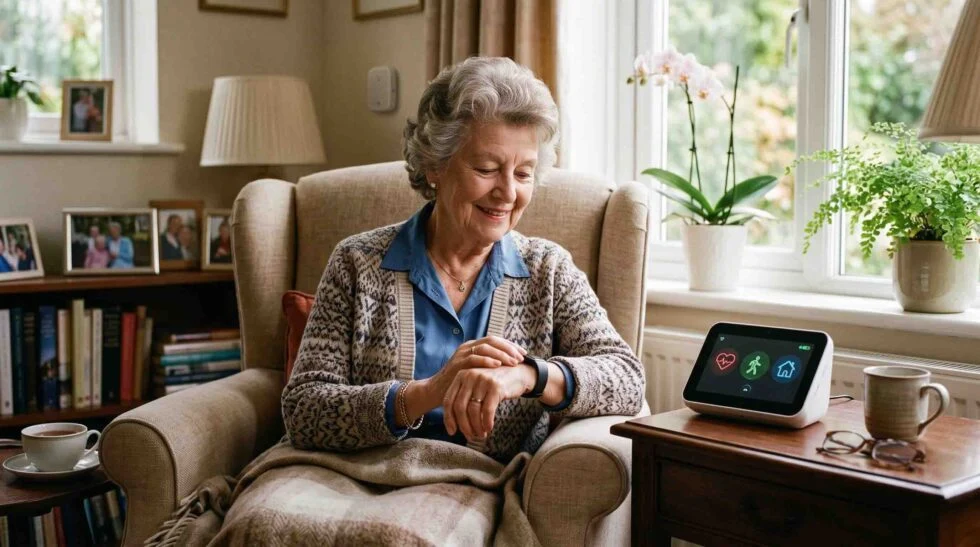
Senior monitoring systems are devices or services that help detect falls, emergencies, or changes in an older adult’s daily routine, then alert a family member or a professional monitoring center. They range from simple wearable help buttons to in-home sensors that quietly track activity patterns. The best senior monitoring system depends on the person’s health risks, how independent they are, and whether the family needs occasional check-ins or 24/7 monitoring.
Falls are the leading cause of injury among adults 65 and older, and more than 14 million older adults, roughly 1 in 4, report falling each year, according to the CDC. That’s the reality driving most families toward this search in the first place: either a fall already happened, or everyone can see one might.
What Is a Senior Monitoring System?
A senior monitoring system, sometimes called an elderly monitoring system, is any device or service designed to keep track of an older adult’s safety, health, or daily activity and alert someone when something seems wrong. That covers a wide range of technology, from a basic help-button pendant to a network of motion sensors that learns a person’s routine and flags unusual changes.
Most monitoring devices for seniors fall into one of these categories:
- Medical alert pendants and wristbands: A wearable button that connects to a monitoring center or a family member with the press of a button.
- Fall detection devices: Wearables with built-in sensors (accelerometers) that can automatically detect a hard fall and send an alert, even if the wearer can’t press a button.
- GPS-enabled mobile devices: For seniors who are still active and leave the house, providing location tracking and two-way communication if they become disoriented or need help away from home.
- In-home sensor systems: Passive sensors placed around the house that monitor movement, activity patterns, and daily routines without requiring the person to wear anything.
- Video and camera-based monitoring: Cameras that allow a family member (or a monitoring service) to check in visually, often with motion alerts.
- Voice-activated systems: Smart speaker-based options that let a senior call for help hands-free, without wearing a device at all.
Families rarely need every category at once. The right combination depends on the person’s specific risks.
Monitoring Devices for Seniors: 6 Types Compared
| Device type | Example products* | How it works | Best for | Typical cost** |
|---|---|---|---|---|
| Medical alert pendant / in-home base | Bay Alarm Medical SOS Home, MobileHelp, Philips Lifeline | Wearer presses a button to reach a monitoring center or contact | Seniors who are alert and can press a button after a fall or emergency | About $20 to $35/month |
| Fall detection wearable | Medical Guardian, Bay Alarm Medical, Apple Watch | Automatically senses a hard fall using motion sensors, no button press needed | Seniors with a history of falls, balance issues, or who live alone | Usually adds about $8 to $12/month to a monitored plan (Apple Watch has no monitoring subscription, but the watch must be purchased) |
| GPS mobile alert device | Medical Guardian MGMini, Bay Alarm Medical SOS All-In-One | Combines emergency alert with location tracking, works outside the home | Active seniors who go out, walk, or have mild wandering risk | Roughly $30 to $45/month, some with an equipment fee |
| In-home sensor system | Passive motion and door sensor kits | Sensors track movement and routine, and alert on unusual inactivity | Seniors who resist wearing a device, or families wanting routine monitoring | Varies by system; confirm with the provider |
| Video / camera monitoring | Indoor home cameras with motion alerts | Live or recorded video, often with motion alerts | Families who want visual confirmation, not just an alert | Varies; some are a one-time equipment cost plus a subscription |
| Voice-activated hub | Aloe Care Health | Hands-free help request through a smart hub, no wearable required | Seniors who won’t wear a device but are comfortable speaking to one | Varies by plan; confirm with the provider |
*Product names are examples, not endorsements. **Prices change often and differ between providers, so always confirm current pricing, equipment fees, and contract terms on the provider’s own website before you buy.
Elderly Monitoring System: Wearable vs In-Home Sensors
Families searching for an elderly monitoring system usually end up choosing between two approaches.
| Wearable (pendant, watch, GPS) | In-home sensors | |
|---|---|---|
| What it detects | An emergency or a fall, in the moment | Changes in daily routine over time |
| Senior has to do something | Wear it and keep it charged | Nothing, it works in the background |
| Works outside the home | Yes, with GPS models | No |
| Main weakness | Only works if it’s worn | Doesn’t detect an emergency instantly |
| Best used | As the primary safety device | Alongside a wearable for seniors who live alone |
For many families, the strongest setup is a wearable for emergencies plus in-home sensors for routine changes.
Fall Monitor for Elderly Parents: What Fall Detection Actually Does
A fall monitor for elderly users is usually a wearable device, such as a pendant, wristband, or smartwatch, with built-in motion sensors that can detect the sudden, sharp movement pattern of a hard fall (like tripping or slipping) and automatically trigger an alert, without the wearer needing to press anything.
A few important realities families should understand before choosing one:
- Fall detection isn’t 100% accurate. No sensor perfectly distinguishes every fall from every quick movement, and false alarms can happen. Independent testing organizations have found detection rates for hard falls vary meaningfully by device and manufacturer.
- “Soft falls” are harder to detect. A slow slide to the floor (from fainting or gradually losing balance) doesn’t always trigger the same sensor pattern as a hard, sudden fall.
- The device only helps if it’s worn. A fall monitor left on a nightstand, including during a shower (a common fall location), can’t detect anything. If your loved one is likely to remove a pendant at certain times, factor that in.
- Response time matters. Ask any provider how quickly a real monitoring center, not just an automated app alert, responds once a fall is detected.
Because falling once roughly doubles a person’s risk of falling again, according to CDC data, a fall monitor is often one of the highest-value additions for a senior who has already had one fall, even a minor one.
Home Monitoring System for Elderly Parents Living Alone
A home monitoring system for elderly parents typically refers to passive, in-home sensor technology rather than a wearable, designed for families who want a general sense of a parent’s daily routine without requiring the senior to wear or operate anything.
These systems commonly include:
- Motion sensors placed in key rooms (kitchen, bathroom, bedroom) that track general activity patterns over time.
- Door and entry sensors that can alert a family member if a door opens at an unusual hour, useful for safety and, in some cases, dementia-related wandering concerns.
- Routine-based alerts, such as a notification if there’s been no kitchen or bathroom activity by a certain time in the morning.
- Two-way voice or video check-in in systems that combine sensors with a communication component.
The main appeal is that it works in the background: no button to remember, nothing to wear or charge. The trade-off is that these systems generally detect changes in routine rather than an emergency in the moment, so they’re often paired with a wearable fall detector rather than used as a complete replacement.
How to Choose the Best Senior Monitoring System
There’s no single best senior monitoring system. The right choice depends on the specific person’s needs, not a universal ranking. Use this framework:
- Has fallen before, or has a diagnosed fall risk: prioritize a fall detection wearable with automatic sensing, not just a manual help button.
- Lives alone and has no one checking in daily: add an in-home sensor system for routine monitoring, alongside a wearable.
- Is still active, drives, or goes for walks: a GPS-enabled mobile device matters more than an in-home-only system.
- Has early memory loss or wandering risk: look at systems with door/exit sensors and GPS, and talk to their doctor about what stage of care they may need.
- Resists wearing any device: an in-home sensor or voice-activated option may get more consistent real-world use than a pendant left in a drawer.
- Needs daily hands-on help: a monitoring device isn’t a substitute for personal care. This is often the point to start exploring in-home care or a residential care setting.
Questions to ask any provider before choosing:
- Is monitoring routed to a professional call center 24/7, or only to family contacts?
- What is the average response time once an alert is triggered?
- Is there a cancellation fee or long-term contract?
- Does fall detection cost extra, and what is the total monthly price with it included?
- Are there equipment or activation fees?
- Is the device water-resistant enough to wear in the shower, where many falls happen?
How We Put This Guide Together
This guide was written by the team at New Day Lifestyle for Seniors, a family-owned senior living referral agency in McKinney, Texas. Founder Mimi Tapia-Bowie has worked in the senior care industry for more than 20 years, has helped thousands of families find the right care, and has opened three assisted living, independent living, and memory care communities from the ground up. Together with Marcus Bowie, she helps families across McKinney, Allen, Frisco, Plano, Dallas, and the greater Dallas-Fort Worth area choose the right level of support for a loved one.
When families come to us, safety at home is often the first concern. A fall, a wandering episode, or a parent living alone is what starts the search. The advice in this guide comes from those conversations, combined with fall-prevention data from the CDC and coverage information from Medicare.gov and Medicaid.gov (linked in the sources below). Product examples and price ranges reflect published 2026 provider and independent review information. They change often, so confirm current pricing and terms directly with each provider before you buy.
Does Medicare or Medicaid Pay for Senior Monitoring Systems?
Generally, Original Medicare does not cover personal emergency response systems (medical alert devices) or in-home monitoring technology, because they’re not classified as durable medical equipment the way a wheelchair or hospital bed is. Some Medicare Advantage plans offer this as a supplemental benefit, so check directly with your specific plan.
Medicaid rules vary by state. Some state Medicaid waiver programs, particularly those that help seniors remain at home rather than move to a nursing facility, include coverage for personal emergency response systems as part of a home- and community-based services benefit. In Texas, families can ask the Texas Health and Human Services Commission (HHSC) or their managed care plan whether a home- and community-based program available to them covers emergency response services. Eligibility and covered services differ significantly, so confirm before you buy.
When Monitoring Isn’t Enough: Recognizing the Next Step
A monitoring system is a valuable safety net, but it can’t do everything. It can alert someone that a fall happened. It can’t prevent the fall, and it can’t provide the daily hands-on help a senior may eventually need with bathing, dressing, meal preparation, or medication management.
Signs that monitoring technology alone may no longer be enough:
- Multiple falls despite having a monitor in place.
- Increasing confusion, missed medications, or unsafe wandering.
- A caregiver who is consistently overwhelmed trying to respond to alerts.
- A senior who needs help with daily activities, not just emergency response.
If any of this sounds familiar, it may be time to look beyond monitoring technology and explore senior care options that provide more consistent, hands-on support, whether that’s in-home care, a smaller residential care home, or a community built around a higher level of daily assistance.
Related reading:
- 10 Signs Your Parent May Be Ready for Assisted Living
- 7 Alternatives to Nursing Homes Worth Considering
- How Memory Care for Dementia Helps Seniors Live Safely
How New Day Lifestyle for Seniors Can Help
Choosing a monitoring device is often just the first step families take, and sometimes it’s the moment that reveals a bigger need. At New Day Lifestyle for Seniors, we help families throughout McKinney, Texas, and the greater Dallas-Fort Worth area figure out what level of support actually fits a loved one’s situation, whether that means staying at home with the right safety tools in place or exploring residential care when monitoring alone isn’t enough. Our guidance is free to families, and we’re happy to talk through where your loved one’s needs currently sit. No pressure, just an honest conversation about what’s next.
Talk to a senior care advisor: call 469-247-9811 or contact us
Frequently Asked Questions
1. What is the best senior monitoring system?
There isn’t one universal “best” system. The right choice depends on the person’s fall risk, activity level, memory status, and whether they’ll consistently wear a device. A senior with a history of falls generally benefits most from automatic fall detection, while an active senior who leaves the house may need GPS more than in-home sensors.
2. What are the best monitoring devices for seniors?
The best monitoring devices for seniors depend on the situation: a fall detection wearable for seniors who have fallen, a GPS device for active seniors, and in-home sensors for seniors who live alone or won’t wear a device. Many families combine a wearable with in-home sensors.
3. What is an elderly monitoring system?
An elderly monitoring system is any device or service that tracks an older adult’s safety or daily activity and alerts a family member or monitoring center when something seems wrong. It can be a wearable, in-home sensors, a GPS device, cameras, or a voice-activated hub.
4. What’s the difference between a senior monitoring system and a fall monitor for elderly parents?
“Senior monitoring system” is the broader category, covering wearables, in-home sensors, GPS devices, and video monitoring. A fall monitor is a device with built-in motion sensors designed to automatically detect a fall and send an alert. It is one type of monitoring device among several.
5. How much do senior monitoring systems cost?
Many services start around $20 to $35 per month, fall detection typically adds roughly $8 to $12 per month, and GPS or smartwatch plans often cost more. Some devices also carry an equipment fee. Always confirm current pricing directly with a provider.
6. Does Medicare cover senior monitoring systems?
Original Medicare generally does not cover personal emergency response systems or home monitoring devices, since they aren’t classified as durable medical equipment. Some Medicare Advantage plans offer this as a supplemental benefit, so check with your specific plan.
7. Does Medicaid cover a home monitoring system for elderly parents?
It depends on the state. Some state Medicaid home- and community-based services waiver programs cover personal emergency response systems for seniors trying to remain at home, but eligibility and covered services vary significantly.
8. How reliable is fall detection technology?
Fall detection is helpful but not perfect. Accuracy varies by device and manufacturer, and “soft falls” (a slow slide rather than a sudden impact) can be harder for sensors to catch. A device only works if it’s actually being worn, including in higher-risk areas like the shower.
9. Can a home monitoring system replace in-person caregiving?
No. A home monitoring system for elderly parents can alert someone that help is needed, but it doesn’t provide hands-on assistance with bathing, dressing, or medication management. If those needs are growing, it may be time to consider in-home care or a residential care setting.
10. Do I need both a wearable device and an in-home sensor system?
Not necessarily, but many families use both: a wearable for emergencies and fall detection, and in-home sensors for general routine monitoring, especially if the senior lives alone.
11. What should I ask before choosing a senior monitoring device?
Ask whether alerts go to a 24/7 professional monitoring center or only to family contacts, what the average response time is, whether fall detection costs extra, whether there are equipment fees or a long-term contract, and whether the device is water-resistant enough for the shower.
12. What if my loved one refuses to wear a monitoring device?
This is common. In-home sensors or voice-activated options can provide some monitoring without anything to wear. If refusal continues and safety concerns are significant, it may be worth a broader conversation about whether staying at home alone is still the safest option.